
Gradle is an open-source that automates the process of packaging a project with the main advantage of high customization and good performance.
Gradle was born later and improved weak parts Maven such as cumbersome declaration syntax, difficult to manage, unoptimized build and testing speed.
To take advantage of these, today we will create a project Spring boot with multiple module values Gradle instead of the Maven traditional ones.
Spring Initializr
To create a Spring project, creating it by hand is a bit difficult, so we will use the one Spring Initializr provided by Spring.
You access: https://start.spring.io
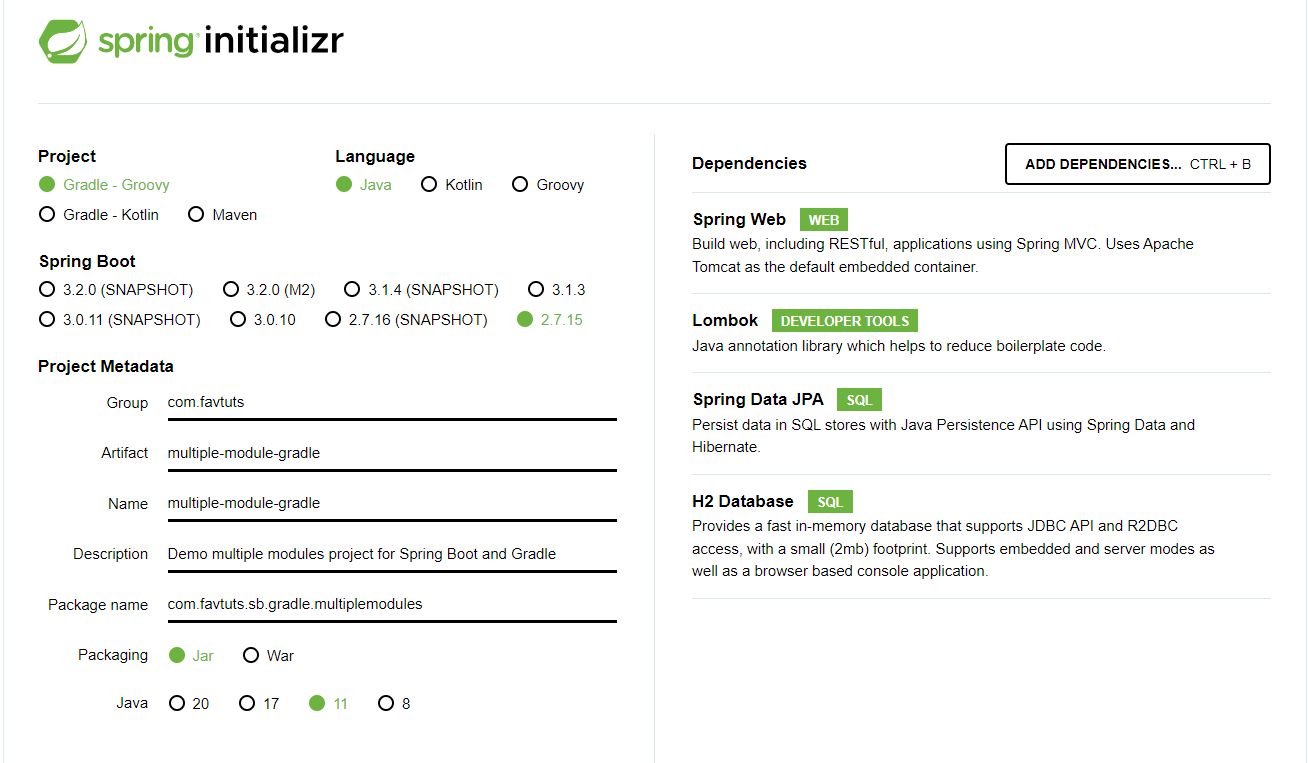
And name the project and select build as Gradle shown:

The first time it will have to be downloaded Gradle Wrapperso it may take a while, please wait. After it finishes syncing, you will get a project like this.

You can check the file build.gradle:
plugins {
	id 'java'
	id 'org.springframework.boot' version '2.7.15'
	id 'io.spring.dependency-management' version '1.0.15.RELEASE'
}

group = 'com.favtuts'
version = '0.0.1-SNAPSHOT'

java {
	sourceCompatibility = '11'
}

configurations {
	compileOnly {
		extendsFrom annotationProcessor
	}
}

repositories {
	mavenCentral()
}

dependencies {
	implementation 'org.springframework.boot:spring-boot-starter-data-jpa'
	implementation 'org.springframework.boot:spring-boot-starter-web'
	compileOnly 'org.projectlombok:lombok'
	runtimeOnly 'com.h2database:h2'
	annotationProcessor 'org.projectlombok:lombok'
	testImplementation 'org.springframework.boot:spring-boot-starter-test'
}

tasks.named('test') {
	useJUnitPlatform()
}
Okay, that’s it for creating a project!
Create module
To serve different purposes, I will divide this project into 2 modules:
common: The purpose is to contain and itsmodelshared userepositoryservice: Handle all tests here
you create the module by: Right Mouse Click> New>New Module

Then select, module is gradle> java and enter the module name:

Delete src folder, and so we have 2 small modules like this:

Config Build.gradle
Now we will reconfigure build.gradleeach module.
The files build.gradle all have information in them, but you can delete them all and add them again as I instructed below
// At build.gradle root, we config for sub-module to have the shared configuration, inherit the plugin and dependencies of the parent.

// Then after that these sub-modules no need to configure any more.

allprojects {
	group 'com.favtuts'
	version '1.0-SNAPSHOT'

	apply plugin: 'java'
	apply plugin: 'idea'

	repositories {
		mavenCentral()
		jcenter()
	}
}

buildscript {
	ext {
		springBootVersion = '2.7.15'
		springManagementVersion = '1.0.15.RELEASE'
		lombokVersion = '1.18.28'

		guavaVersion = '32.1.2-jre'
		commonLang3Version = '3.13.0'
		mysqlVersion = '8.0.13'
	}
	repositories {
		mavenCentral()
		jcenter()
	}
	dependencies {
		classpath("org.springframework.boot:spring-boot-gradle-plugin:${springBootVersion}")
		classpath("io.spring.gradle:dependency-management-plugin:${springManagementVersion}")
	}
}

subprojects {
	apply plugin: 'io.spring.dependency-management'
	apply plugin: 'org.springframework.boot'

	sourceCompatibility = 11
	targetCompatibility = 11

	def defaultEncoding = 'UTF-8'
	tasks.withType(AbstractCompile).each { it.options.encoding = defaultEncoding }

	javadoc {
		options.encoding = defaultEncoding
		options.addBooleanOption('Xdoclint:none', true)
	}

	compileJava.dependsOn(processResources)

	springBoot {
		buildInfo()
	}

	dependencies{
		annotationProcessor "org.springframework.boot:spring-boot-configuration-processor"
		annotationProcessor "org.projectlombok:lombok:${lombokVersion}"
		compileOnly "org.springframework.boot:spring-boot-configuration-processor"
		compileOnly "org.projectlombok:lombok:${lombokVersion}"

		// SPRING DEPENDENCIES
		implementation "org.springframework.boot:spring-boot-starter-data-jpa"
		implementation "mysql:mysql-connector-java:${mysqlVersion}"

		// Utilities
		implementation "com.google.guava:guava:${guavaVersion}"
		implementation "org.apache.commons:commons-lang3:${commonLang3Version}"

		// TEST
		testImplementation 'org.springframework.boot:spring-boot-starter-test'
	}

}

project(':service') {
	dependencies {
		implementation project(':common')
		implementation 'org.springframework.boot:spring-boot-starter-web'
		implementation 'org.springframework.boot:spring-boot-devtools'
	}
}

project(':common'){

}
At build.gradlethe module service. ( multiple-module-gradle/service/build.gradle):
// This be leaved empty then can be added more later
At build.gradlethe module common. ( multiple-module-gradle/common/build.gradle):
// The common module we disable the bootJar
bootJar.enabled=false
jar.enabled=true
Write a demo program
We will create a simple project:
common: No model information yetUser.service: CreateUserand use the layercommonto save it
Common
Module structure common:

// User.java
import java.io.Serializable;

import javax.persistence.Entity;
import javax.persistence.GeneratedValue;
import javax.persistence.Id;
import lombok.Data;
import lombok.RequiredArgsConstructor;

@Entity
@Data
@RequiredArgsConstructor
public class User implements Serializable {

    @Id
    @GeneratedValue
    private Long id;

    private final String name;
}
// UserRepository

import org.springframework.data.jpa.repository.JpaRepository;

public interface UserRepository extends JpaRepository<User, Long> {
}
We just made a demo to prove that it moduleworks 🙂  ))
))
Here I use H2 Database, which is a type of database stored in memory, autoconfigured in it Springboot, so you just need to create a class Userlike that, then run the program and it will automatically create tableaccordingly.
And the annotation other foreigners are yours Lombok.
Service
In the module servicewe will use the floor common:

// Application.java

import lombok.RequiredArgsConstructor;
import org.springframework.boot.CommandLineRunner;
import org.springframework.boot.SpringApplication;
import org.springframework.boot.autoconfigure.SpringBootApplication;

import javax.transaction.Transactional;

@SpringBootApplication
@RequiredArgsConstructor
public class Application implements CommandLineRunner {
    public static void main(String[] args) {
        SpringApplication.run(Application.class, args);
    }

    // No need @Autowired because we already have @RequiredArgsConstructor
    private final UserRepository userRepository;

    @Override
    @Transactional
    public void run(String... args) throws Exception {
        User user = new User("favtuts");

        user = userRepository.save(user);
        System.out.println(user);
    }
}
Run the program:
// Output
// User(id=1, name=favtuts)

// user be inserted into database with id = 1.
// project runs successfully!
Epilogue
So we have created a project with many modules equal to Gradle and Spring boot. It can be seen Gradle that it allows us to make declarations that are quite readable and neat. In addition, it is also provided by the open-source community plugin, so we almost don’t need to do much, just apply the plugin and you’re done!
Details of my project are on Github .
Good luck! Don’t forget to like or share to support me ahoho!:3